
Table of Contents
If your pages, blog posts, or backlinks aren’t indexed on Google, they don’t exist in search results — no matter how good your content is. That’s exactly the problem a seo rapid index checker is built to solve, and in 2026, one tool has been dominating search interest for it: Rapid Index Checker.
In this review, we’ll break down what Rapid Index Checker actually does, whether it’s free or paid, how it compares to Google Search Console, and how you can use it alongside your existing SEO strategy — from technical fixes to your on-page SEO checklist and off-page SEO checklist that actually moves rankings.

What Is a Rapid Index Checker?
A rapid index checker is an SEO utility that tells you whether a specific URL is present in Google’s index — meaning it can actually show up in search results. This is different from ranking. A page can be perfectly optimized, follow every rule of a solid on-page SEO framework, and still get zero traffic simply because Google never indexed it.
Rapid Index Checker, launched in early 2026, takes this a step further. Instead of relying on Google Search Console — which can lag three to four days behind real search results — it queries live SERPs directly. That means you see the real, current indexing status of a page right now, not what Google reported several days ago.
In plain terms
It's a URL crawling validator and search visibility tracker rolled into one dashboard.
Why Indexing Matters More Than Most SEOs Realize
Most beginners obsess over rankings and forget the step that comes before ranking — indexing. If a page shows “Crawled – currently not indexed” in Search Console, it means Google visited the page but decided not to add it to the index, usually because of
- Weak internal or external authority signals
- Duplicate or thin content
- Crawl budget issues on large sites
- Accidental noindex tags or blocked robots.txt rules
- Broken canonical tags pointing elsewhere
This is exactly the kind of situation where relying on a dedicated Google indexing status tool rather than guesswork saves hours of manual investigation.
This is where a dedicated Google index checker tool becomes essential — especially for agencies managing multiple client sites or for anyone running professional SEO services where indexing delays directly cost clients traffic and revenue.
Rapid Index Checker Review 2026 — Feature Breakdown
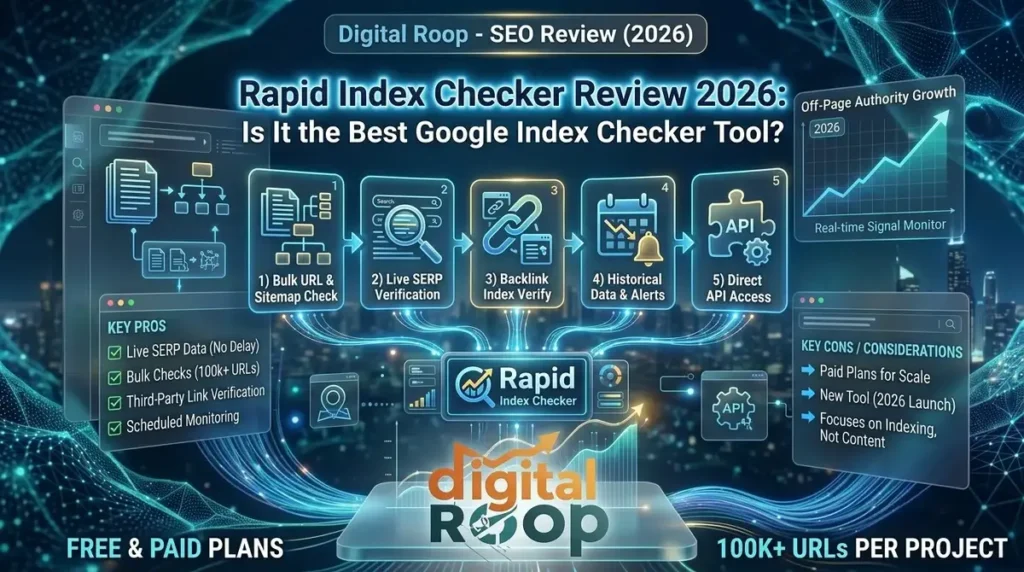
Bulk URL and Sitemap Checking
Instead of checking pages one by one, Rapid Index Checker lets you paste URLs directly, upload a CSV, TXT, or JSON file, or sync your entire XML sitemap. It processes large batches in seconds — genuinely useful for bigger sites or agencies auditing dozens of client domains at once.
Live SERP Verification (Not Delayed Data)
This is the tool's biggest differentiator. According to its official product page, Rapid Index Checker queries Google search results directly to confirm indexing status, rather than depending on cached Search Console reports — catching de-indexing issues days before Search Console would show a change.
Backlink Index Verification
If a backlink lives on a page that isn't indexed, it passes zero SEO value to your site — a detail many people miss when following common off-page SEO techniques. Rapid Index Checker can check third-party URLs too, so you can verify guest posts and link placements before reporting results to a client.
Indexing History and Alerts
The tool stores historical indexing data and sends alerts — email, in-app, or webhook — whenever a monitored page drops out of the index. Free accounts keep 30 days of history; higher-tier plans extend that significantly.
Chrome Extension
A browser extension checks the indexing status of whatever page you're currently viewing, without opening the dashboard — handy for quick spot-checks during a technical SEO audit.
Is Rapid Index Checker Free or Paid?
Rapid Index Checker offers a free tier for individual users, with paid plans unlocking bulk checking limits, scheduled monitoring, longer history retention, and full API access. For most solo bloggers or small business owners just verifying a handful of pages, the free tier is usually enough. Agencies checking indexing status across many client domains will likely need a paid plan for the higher URL limits and automation features.
Rapid Index Checker Pricing (2026)
Rapid Index Checker uses a tiered monthly plan structure, plus one-time credit packs for teams with irregular volume. If you’re comparing Rapid Index Checker Pricing against other tools, here’s what each tier includes as of 2026:
| Plan | Monthly Price | Checks | Projects | Key Features |
|---|---|---|---|---|
|
Free |
$0 |
150 |
1 |
Manual indexing submissions, alerts & notifications, 30-day history |
|
Lite |
$12 |
3,000 |
10 |
Scheduled monitoring, auto-submit to indexing service, 90-day history, manual sitemap sync |
|
Pro |
$39 |
12,000 |
50 |
API access, indexability diagnostics, webhooks, weekly sitemap auto-sync, auto-stop on indexed, 1-year history, 7-day free trial |
|
Team |
$119 |
40,000 |
150 |
5 team members, daily sitemap auto-sync, 2-year history |
|
Business |
$279 |
100,000 |
600 |
100 team members, hourly sitemap auto-sync, 3-year history |
One-time credit packs are also available (5,000 credits for $29, 12,000 for $59, 30,000 for $149), and annual billing saves two months compared to paying monthly.
Our Take
The Free plan’s 150 monthly index checks are genuinely useful for bloggers, niche website owners, and local businesses that publish a limited number of pages each month. However, agencies or SEO teams monitoring multiple client websites can quickly exhaust that allowance. If you routinely run bulk Google index checks or automate monitoring across dozens of projects, the Lite plan is the practical starting point, while the Pro plan becomes worthwhile for API integrations, advanced diagnostics, and automation workflows.
Rapid Index Checker vs Google Search Console
The honest takeaway: Google Search Console is still essential for your own verified site. But for checking pages you don’t control — backlinks, competitor domains, guest posts — a website seo checker like Rapid Index Checker fills a gap Search Console simply can’t.
Data Freshness
Google Search Console
Rapid Index Checker
Third-Party URL Checks
Google Search Console
Rapid Index Checker
Bulk Checking
Google Search Console
Rapid Index Checker
Scheduled Monitoring
Google Search Console
Rapid Index Checker
Cost
Google Search Console
Rapid Index Checker
The honest takeaway
Google Search Console is still essential for your own verified site. But for checking pages you don't control — backlinks, competitor domains, guest posts — a website seo checker like Rapid Index Checker fills a gap Search Console simply can't.

Rapid Index Checker vs Other Index Checker Tools
Google Search Console isn’t the only alternative worth knowing about. Here’s how Rapid Index Checker compares against three other tools people search for when evaluating a bulk Google index checker:
| Tool | Indexability Diagnostics | Third-Party URL Checks | Scheduled Monitoring | Starting Price |
|---|---|---|---|---|
|
Rapid Index Checker |
Yes — noindex, robots, redirects, canonicals |
Yes |
Hourly to monthly |
Free (150 checks) / $12/mo |
|
Google Search Console |
Yes, owned properties only |
No |
No |
Free |
|
IndexCheckr |
No |
Yes |
Yes |
$15 (2,000 credits) |
|
Indexly |
No |
Limited |
Yes, automated |
$49/mo |
|
Small SEO Tools |
No |
Yes |
No |
Free (5 URLs/check) |
The short version
If you need to know why a page isn’t indexed — not just that it isn’t — Rapid Index Checker and Google Search Console are the only two tools on this list that tell you. Rapid Index Checker adds the ability to run that diagnosis on pages you don’t own, which GSC can’t do at all.
How Indexing Connects to Your On-Page and Off-Page SEO
Indexing isn’t a standalone task — it’s the bridge between the two sides of your SEO strategy. For the bigger picture on how AI is reshaping strategy overall, see our guide to SEO AI in 2026. Your on-page and off-page SEO working together only produces results if the pages involved are actually indexed.
On the on-page side, following a solid step-by-step on-page SEO framework — clean headings, optimized meta tags, internal linking, fast load times — gives Google every reason to index and rank your content quickly. If you’re still building this foundation, get the basics right before layering in indexing checks.
On the off-page side, a link is worthless if the page hosting it isn’t indexed. Pair Rapid Index Checker with a proper, complete off-page SEO guide so every backlink you build is actually contributing to your authority — not sitting invisible in limbo.
Using Rapid Index Checker for Local SEO
Local businesses face a specific version of this problem: your Google Business Profile can be perfectly set up, but if your website’s location pages aren’t indexed, you’re still invisible in local search. Take the time to optimize your Google Business Profile alongside checking that your core location and service pages are indexed.
This matters even more for geo-targeted campaigns. If you’re building out digital marketing strategies built for Dehradun businesses, verifying that your city and service landing pages are indexed should be one of the first technical checks you run — not an afterthought.
Step-by-Step: How to Check If Your Website Is Indexed

1
Create a free Rapid Index Checker account and add your domain or sitemap.
2
Import your URL list — paste manually, upload a CSV, or sync your XML sitemap automatically.
3
Run the bulk check to see which pages are indexed, not indexed, or fluctuating.
4
Review the diagnostics for any page marked "not indexed" — look for noindex tags, robots.txt blocks, or redirect issues.
5
Fix the technical blocker, then resubmit the page for a fresh check.
6
Set up scheduled monitoring so you're alerted automatically if an indexed page ever drops out.
6 Reasons Google Won't Index a Page
Noindex meta tags left on accidentally after a site migration
Robots.txt disallow rules blocking Googlebot from crawling key sections
Redirect chains or loops that confuse crawlers
Canonical tag conflicts pointing to the wrong version of a page
HTTP 4xx/5xx errors silently blocking indexing
Low-quality or thin content that Google deems insufficient to index
Running this check regularly should be a standing item in your on-page SEO checklist — not just something you do once after launch. For the deeper technical fixes behind noindex tags, robots.txt rules, and canonical conflicts, see our complete technical SEO guide.
Who Should Actually Use This Tool?
SEO agencies managing indexing reports across multiple client sites
Link builders verifying that guest posts and backlinks are indexed before reporting results
E-commerce and large sites tracking indexation during migrations or redesigns
Local businesses confirming their service and location pages are visible in search
Niche site owners — including specialised service businesses — who need every service page indexed to capture local search demand
If managing this in-house feels like too much, it’s exactly the kind of technical gap a good digital marketing team is built to handle for clients.
Rapid Index Checker: Pros and Cons
How This Fits Into a Full SEO Workflow
Think of a rapid index checker less as a standalone tool and more as one layer in a bigger indexing status tool stack. A typical monthly workflow looks like this:
- Publish or update content following your existing on-page SEO checklist.
- Wait a few days, then run a bulk check to confirm the new URLs made it into Google's index.
- Cross-check any backlinks built that month as a backlink index checker, confirming link equity is actually flowing through.
- Log any pages stuck in "crawled, not indexed" as a technical SEO task, alongside other web page indexing monitor alerts.
- Review trend data monthly — a sudden drop in indexed pages is often the earliest warning sign of a bigger technical issue.
Treated this way, a rapid index checker becomes a recurring quality-control step, the same way a link crawl checker or search visibility tracker would sit inside a larger reporting dashboard. For agencies, a monthly indexing snapshot also makes client reporting far more credible — proof of visibility, not just promises of rankings.
Final Verdict
Rapid Index Checker earns its place in a 2026 SEO toolkit because it solves a genuinely underserved problem: verifying indexing status quickly, in bulk, and for pages you don’t even own. It won’t replace your content strategy, your off-page link-building work, or a well-planned social media push — but as a diagnostic layer sitting underneath all of that work, it’s one of the more useful new tools to show up this year.
Need help fixing indexing & ranking issues?
At Digital Roop, whether it’s a stuck local listing, an under-indexed blog, or a full technical audit, our team can handle it end to end — so your pages get found, indexed, and ranked, not just published.
FAQs
Frequently Asked Questions
Is Rapid Index Checker free or paid?
Plans start free for 150 checks per month. Paid tiers start at $12/month for higher volume, scheduled monitoring, API access, and bulk limits for agencies and larger sites.
What does Rapid Index Checker actually show for each URL?
For every URL checked, Rapid Index Checker returns a live indexed/not-indexed status pulled from real SERP data. When relevant, it also identifies the likely cause if a page isn’t indexed—such as a noindex tag, a robots.txt block, a redirect chain, or a canonical conflict pointing elsewhere.
Is Rapid Index Checker better than Google Search Console?
Not a replacement—a complement. Search Console remains essential for your own verified properties, but Rapid Index Checker adds live data, bulk checking speed, and the ability to check third-party or competitor URLs, which Search Console can’t do.
Do I need Google Search Console if I already have Rapid Index Checker?
Yes. Search Console provides essential diagnostic data that Rapid Index Checker can’t—such as Core Web Vitals, mobile usability, and official crawl-date confirmation for verified properties. Use Rapid Index Checker for speed, bulk checks, and competitor analysis, and use GSC as your ultimate source of truth for your own site’s technical health.
How is a rapid index checker different from a regular SEO checker?
A general website SEO checker usually scores on-page factors like meta tags, headings, and content quality. A rapid index checker focuses on one specific, critical question: is this page actually inside Google’s index right now?
Can I check my competitor's indexed pages?
Yes—this is one of the key advantages over Search Console. Because Rapid Index Checker verifies live SERP data rather than requiring domain ownership, you can check any public URL, including competitor domains, without needing access to their Search Console.
Do I need this tool if I'm just starting a blog?
Is Rapid Index Checker accurate?
Rapid Index Checker is accurate for confirming that a URL currently appears in Google’s live search results, since it queries real SERPs rather than cached data. Like any indexing checker, though, Google can occasionally omit a genuinely-indexed page from a site: search, so a negative result is worth double-checking against Search Console impressions before assuming a page has dropped from the index.
Does Rapid Index Checker actually work?
Yes — Rapid Index Checker works by running a live SERP query for each URL you submit and returning an indexed/not-indexed status within seconds, which is faster than waiting on Google Search Console’s 3–4 day reporting lag. It won’t force Google to index a page on its own; it tells you the current status and, on paid tiers, can trigger a submission to an indexing provider to help.
How does the Rapid Index Checker Chrome extension work?
The Rapid Index Checker Chrome extension checks the indexing status of whatever page you’re currently browsing without needing to open the main dashboard. This is useful for quick spot-checks — for example, confirming a competitor’s blog post or a guest post you just published is indexed — mid-audit, without breaking your workflow to log in separately.
Does Rapid Index Checker export data to CSV?
Yes, Rapid Index Checker supports CSV export for check results and history, alongside PDF reports on paid plans — useful for agencies compiling monthly indexing reports for clients. Free-tier users can export their 30-day history; paid tiers extend export access to the longer retention windows (90 days on Lite, up to 3 years on Business).
Can Rapid Index Checker diagnose robots.txt blocking issues?
Rapid Index Checker checks robots.txt disallow rules as part of its indexability diagnostics, flagging when Googlebot is blocked from crawling a page alongside other blockers like noindex tags, redirect chains, and canonical conflicts. This separates “the page isn’t indexed” from “here’s specifically why,” which a plain index checker without diagnostics can’t tell you.
Does Rapid Index Checker keep indexing history and trend data?
Rapid Index Checker stores historical indexing data so you can see when a page entered or dropped out of Google’s index over time, not just its status right now. Free accounts keep 30 days of history; paid tiers extend retention up to 3 years on the Business plan, which matters if you’re tracking indexing trends across a site migration or algorithm update.


